Obsidian Tasks Series, Part 9 - Backstopping Your Task Management System
Welcome back to this mini series on the Obsidian Tasks Community Plugin. My intention with this series is to help you learn the functionality of the Obsidian Tasks Community Plugin so you can build a task management system in Obsidian that works for you. There is a YouTube video to accompany each article in this series, so feel free to check that out. The videos and articles roughly parallel one another.
We’re nearly to the end of the series. Let’s review what we’ve already covered!
Backstopping Your Task Management System ← You Are Here
Works Well with Obsidian Tasks Community Plugin
In the most recent article/video in the series, you built your system. I hope you’ve started using it. If you have, maybe you’ve noticed some things already feel like they are falling through the cracks. If so, then today’s video is designed to help you find and seal the cracks - or at least remember to check them every so often for leaks. I call this process backstopping, and it’s a term I borrowed from my friend R.J. Nestor and his amazing book The Rhythms of Productivity.
Let’s dive in.
Backstopping is a way to prevent - or at least to mitigate - the blind spots in your system.
Our aim with backstopping is to keep things from falling through the cracks. Today, I’m going to show you a few regular strategies for backstopping your system that have helped my Obsidian coaching clients and Obsidian students over the years. These virtual and physical safety nets will help you - particularly as you iterate your system - to make it more resilient.
Avoid making things overly complex. I’m going to show you a few backstops that are crazy simple. Trying to backstop every possible eventuality in your system is really a sign that you don’t trust your system. If you don’t trust your system, you need to look at why that is and adjust for that rather than building more and more backstops.
The best backstops - margin and review
In the most recent article and video, I talked about designing a task management system that works for you. We haven’t talked much in this series about deciding whether to even agree to take something on. And that leads us to the very best - and also hardest to implement - backstops: margin and review.
I spent more than a decade working in situations where I often went from meeting to meeting with no scheduled breaks from 7 a.m. to 7 p.m. - for multiday stretches. While I’m proud of that part of my career journey and the incredible work my colleagues and I did together, I can also reflect now on how unproductive that made me. I could say that I had no control. In reality, I had far more control than I ever took AND as a leader in the organization, I should have modeled better behavior.
Stop right now and look at your calendar or task list. Where can you see white space? Where is the margin? If there isn’t any, then you could begin by only accepting meetings that are 20 or 50 minutes in length. You can also start by blocking out an hour (or more) at the beginning and end of the day plus a couple of breaks in the day. When I was at my best, my admin and I blocked GSD blocks on my calendar (get s*** done blocks).
If you don’t schedule margin in your life, no one else will do it for you.
In addition to having margin so you can simply deal with new things that happen in your life, you also have to think about how you’ll keep it all together. You know that saying about getting your ducks in a row? If you don’t spend time with the ducks making sure they have their marching orders each day, week, month, and so on, they’ll never get in a row. So, as you’re taking this time to build and think about your task management system and your overall productivity, consider how to build review processes and habits into your life. While I’m in no way perfect at doing them, I know that days when I accomplish at least one of a daily startup routine or a daily shutdown routine are going to be better days. The days when I do both are nearly always phenomenal - no matter what happens during the day. And that is because I had a chance to catch my breath and simply reflect and review and start myself off right for today and set myself up right for tomorrow. Weekly, monthly, and quarterly reviews are also a big part of my life and doing them has helped make me more accountable - first to myself and then to others.
Tactic 1: Look for Overdue Tasks
Let’s start with the simplest backstop of all, and one we actually touched on earlier in the series when we were talking about queries.
The most basic way to backstop your system is to regularly look for overdue tasks.
That query is simple:
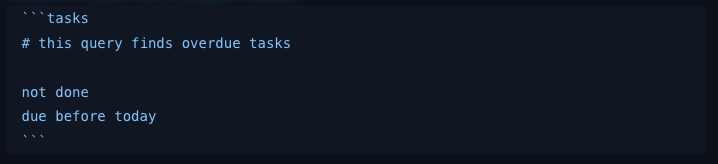
Sample query for finding overdue tasks
Here it is if you want to copy and paste:
# this query finds overdue tasks

not done
due before today
Tactic 2: Look for Invalid Dates
Unlike some task managers like Todoist, the Tasks Community Plugin doesn’t stop you from entering an invalid date. So, if you enter February 30, the tasks community plugin will allow it. Even if you enter something like December 35, the tasks community plugin will allow it.
Because of this, the Tasks plugin documentation includes the following query you may wish to include in your review processes.
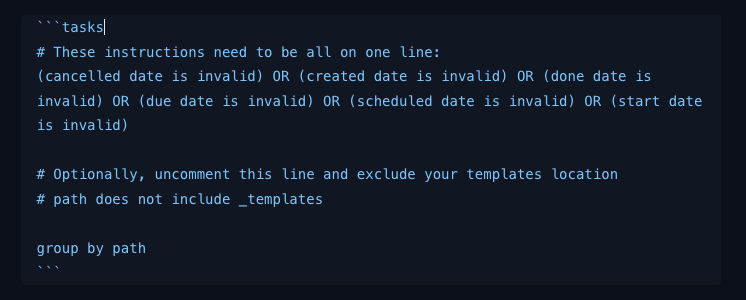
Here is the text if you want to copy and paste this into your vault:
# These instructions need to be all on one line:
(cancelled date is invalid) OR (created date is invalid) OR (done date is invalid) OR (due date is invalid) OR (scheduled date is invalid) OR (start date is invalid)

# Optionally, uncomment this line and exclude your templates location
# path does not include _templates

group by path
Tactic 3: Look for Recurring Tasks That Are Missing Dates
The third backstop comes straight out of our article and video on recurrence.
Recurring tasks require at least one key date - due, scheduled, or start - in order to behave the way you expect them to behave. That said, it is possible to create recurring tasks that do not have one of those dates, especially if you are adding or editing them inline.
So, one important backstop in a system that uses recurrence is a query that looks for recurring tasks that lack all three of those dates.
That looks like this:
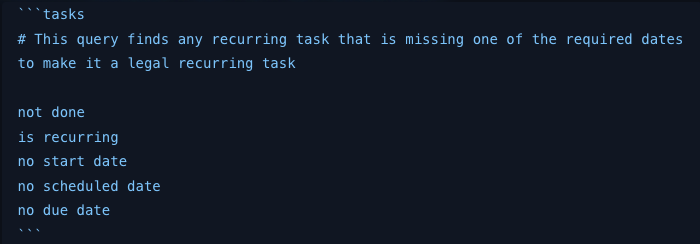
Obsidian Tasks query for finding recurring tasks with missing dates
Here is that code to copy and paste if you’d like:
# This query finds any recurring task that is missing one of the required dates to make it a legal recurring task

not done
is recurring
no start date
no scheduled date
no due date
Tactic 4: Look for Tasks Missing Your Global Task Filter
If you are using a Global Task Filter, then one of the biggest risks in your system is very simple:
You forget to add the filter.
There is a really easy way to check tasks against this, but it does involve adding another community plugin to your system - and that is Dataview. The Dataview plugin has been around since before the tasks community plugin and actually has task management capabilities. Dataview and its newer big sister Datacore are well beyond the scope of this video series. However, if you use the Global Filter and you do want to review your tasks every few days to make sure you’ve not accidentally missed the filter on those tasks, then first install and enable the Dataview community plugin.
Then, in a note where you want to review your tasks to make sure that they are not missing the global task filter, add this Dataview query:

The simple Dataview query to make sure you don’t forget the task filter on any of your tasks.
A note on commenting Dataview queries: Dataview does not natively support comments. I added a markdown comment that will get hidden if you’re viewing the page in reading mode, but will be present in live preview. There are other workarounds to commenting Dataview, but this is the one I use most often.
Tactic 5: Review Tasks With Missing Dates
Depending on how you work, another valuable backstop can be a query for tasks that are not done but do not yet have the date information you usually expect them to have.
This does not mean every task must have a date - and it especially does NOT mean that every task has to have every kind of date.
I fully urge against that.
But if in your system, certain types of tasks usually should have a due date or a start date, then looking for tasks that lack those dates can be really useful. Maybe every task in the project folder should have a due date.
For example, if you require a due or scheduled date on a task, you could use a query like this and simply insert the specific date type or types in the query using the nomenclature from the Tasks Quick Reference Guide.
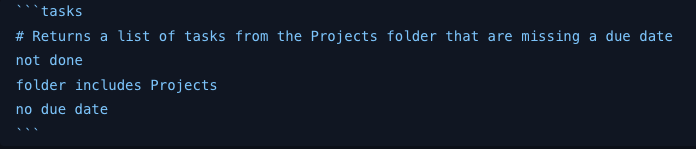
A sample query for catching tasks in a specific folder that do not have due dates.
Many, many iterations of this specific query could be created and added to a proper review location in your vault to allow you to double check the accuracy of your entries from time to time.
I’ll caution you again here. The best system is one with intentional margin and review time. Reviewing tasks you’ve entered before you leave the page they are on - because you’ve built in at least 10 minutes between meetings and events - is the BEST way to catch issues before they become a problem. Trying to manufacture a system where you attempt to catch every issue a week or more after the fact will be noisy, complex, and ultimately unhelpful.
Design Question 6: What might fall through the cracks?
In our system design article and video, I presented five design questions you need to consider when building your system. We’re going to add two more questions to that now to round out system design. The first is "What might fall through the cracks?"
To answer this question, you have to know yourself and what commonly trips you up. For me, it’s usually forgetting to go back and look at overdue items and clean those up - either pushing them forward to another day or saying it’s not going to happen. In my version of the system, I’ve tried not to even give due dates or scheduled dates to things that are not absolute commitments. Even in that case, I still have tasks that are hanging around because I’ve not gotten them done and I’ve had to renegotiate their due date with myself and/or the person I made the commitment to. I need to look at overdue tasks at least once a week - and for me it’s actually daily. This leads to our final design question: where do you need to put these backstop and review queries so they stay useful instead of becoming noise?
Design Question 7: Where do you put backstop queries to keep your system healthy?
I’ve already mentioned that I like to review my overdue tasks daily so I’ve built that in as a part of my daily note template. If that’s too much noise for you, put it on a weekly note or put it on its own note and set a recurring task to remind you to go look at that specific note every three or four days. There is no perfect way other than what ends up working well for you.
I will say that this is a place where both pre- and post-planning time - or prep and review time as it might better be called - are critical. If you aren’t protecting your calendar - and thus yourself - from overrun by blocking out time for prep and review, take the time and do that now. And know that I am not perfect at this - you have perfect evidence of that. I wanted to be done with this Tasks series at the end of March. As it stands, the 10th video will likely come out at the end of November. Life happens and we have to renegotiate what’s important with ourselves all the time. That is the simple truth of being human. So, give yourself grace and build in time to reprioritize, renegotiate, and make sure that you’re still working on the things that are most important to your life.
Closing
In the FINAL(!!) article and video in this series, we’re going to look at tools and approaches that work especially well with Obsidian Tasks.
I’ve mentioned a few of these already - tools like Kanban boards, Templater, and even a mobile app called TaskForge that you may find really valuable.
In the meantime, I’d love to know: what is the biggest place where tasks tend to fall through the cracks for you?
If you’ve got questions about Obsidian Tasks or if there’s a backstop you use in your own system that I didn’t mention, feel free to leave a comment.
I’ll see you back here in the next one.